之前因為 一直有iOS 5 的案子
發現好多新的用法與技術都沒有用到 或知道
正好有一段空閒的時間
趕快把library更新
2013年12月25日 星期三

2013年11月16日 星期六
[iOS] Web api with CoreData
當然 已經有很多好用的api
像是 AFIncrementalStore
但是其實我沒有用過
現在也沒有空去改用
原因是.... 遇到太多的廠商開的api是在亂七八糟....
因此還是得自己針對案子去設計model
不過最近遇到下面的問題
-> 當 api 有 paging的功能,卻設計了一個 infinite scroll view
一般來說我常用的作法是
api -> 接到的data 直接存在 CoreData中
view -> 透過 NSFetchedResultsController 拿 CoreData的資料
但是如果加上了 page呢?
page意味著說每頁的資料在每次拿可能都不一樣
api 是"一頁一頁"的呈現資料
但是 UI 設計的是一個 infinite scroll view
並不會知道轉到了哪一頁(往往後端又想保留每頁可以動態調整資料數量的權力),即便是每個資料都有id
例如cache了10的資料,
當下次在開啟時,api 應該要更新哪些資料?第一頁?一到十頁?
似乎都不太對,
因此,試想了一下規則
1. 用一個Global 變數去儲存該api 已經拿到第n的頁數 (假設頁數為連續)
2. 離開app時(或剛進入app時),清除掉所有跟page api 有關的object
3. 如果設計需要,在離開該頁面時,清除掉所有跟page api 有關的object
造成的結果會是
在這次開啟app的狀況下,使用者會看到cache的結果,頁面資料只會拿一次(不會更新資料,因為global 變數去記錄該api已經拿到第幾頁)
在下次開啟該app 則會清除上次看過的資料,然後重新向server拿新資料
這樣應該可以解決大部分的問題吧
像是 AFIncrementalStore
但是其實我沒有用過
現在也沒有空去改用
原因是.... 遇到太多的廠商開的api是在亂七八糟....
因此還是得自己針對案子去設計model
不過最近遇到下面的問題
-> 當 api 有 paging的功能,卻設計了一個 infinite scroll view
一般來說我常用的作法是
api -> 接到的data 直接存在 CoreData中
view -> 透過 NSFetchedResultsController 拿 CoreData的資料
但是如果加上了 page呢?
page意味著說每頁的資料在每次拿可能都不一樣
api 是"一頁一頁"的呈現資料
但是 UI 設計的是一個 infinite scroll view
並不會知道轉到了哪一頁(往往後端又想保留每頁可以動態調整資料數量的權力),即便是每個資料都有id
例如cache了10的資料,
當下次在開啟時,api 應該要更新哪些資料?第一頁?一到十頁?
似乎都不太對,
因此,試想了一下規則
1. 用一個Global 變數去儲存該api 已經拿到第n的頁數 (假設頁數為連續)
2. 離開app時(或剛進入app時),清除掉所有跟page api 有關的object
3. 如果設計需要,在離開該頁面時,清除掉所有跟page api 有關的object
造成的結果會是
在這次開啟app的狀況下,使用者會看到cache的結果,頁面資料只會拿一次(不會更新資料,因為global 變數去記錄該api已經拿到第幾頁)
在下次開啟該app 則會清除上次看過的資料,然後重新向server拿新資料
這樣應該可以解決大部分的問題吧
[iOS] Core Data 的 思
我的Core Data 的思維模式大致上是從
https://github.com/robbiehanson/XMPPFramework
XMPPFramework / Extensions / CoreDataStorage
中得到想法或靈感
其中比較重要的是
他利用多執行續去執行 core data (在 apple 的guide line 中其實不建議用多執行續去做)
我將這個方法套用在我現在的專案上
1. model control 動作後,會呼叫 sub thread 上的 NSManagedObjectContent (moc) 做動作
2. VC 上,用的是 Main thread moc 產生的 NSFetchedResultsController 來操縱 View
一開始看起來都還ok
不過最近卻發現一些問題
https://github.com/robbiehanson/XMPPFramework
XMPPFramework / Extensions / CoreDataStorage
中得到想法或靈感
其中比較重要的是
他利用多執行續去執行 core data (在 apple 的guide line 中其實不建議用多執行續去做)
我將這個方法套用在我現在的專案上
1. model control 動作後,會呼叫 sub thread 上的 NSManagedObjectContent (moc) 做動作
2. VC 上,用的是 Main thread moc 產生的 NSFetchedResultsController 來操縱 View
一開始看起來都還ok
不過最近卻發現一些問題
2013年10月6日 星期日
[iOS] Xcode 5 new project for iOS 5.x
我也不想
不過之前還沒執行的案子有說要支援 5.x
那就只好設定了
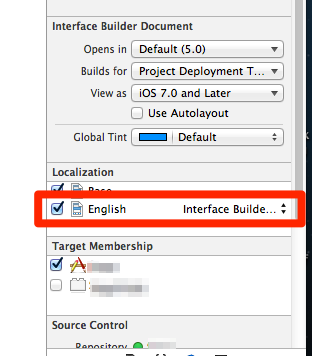
我也不確定實機上會有不有問題
不過如果是模擬器上面
english 沒有勾選,似乎會讓setting找不到 Main.storyboardc
我猜可能是Base.proj 的關係(似乎 iOS6 or 7 有把storyboard的多語系改成 一個 storyboard 配合多 string file的模式,恩 這樣感覺也比較合理)
過度時期,先這樣做吧
2013年9月22日 星期日
2013年9月12日 星期四
2013年9月10日 星期二
2013年9月6日 星期五
[iOS] crash report
http://stackoverflow.com/questions/1460892/symbolicating-iphone-app-crash-reports
雖然說成功的叫出來了 不過資訊似乎不太正確 ….. 最後還是看crash report 上面的字眼
Steps to analyze crash report from apple:
-
Copy the release .app file which was pushed to the appstore, the .dSYM file that was created at the time of release and the crash report receive from APPLE into a FOLDER.
-
OPEN terminal application and go to the folder created above (using CD command)
-
atos -arch armv7 -o YOURAPP.app/YOURAPP MEMORY_LOCATION_OF_CRASH. The memory location should be the one at which the app crashed as per the report.
Ex: atos -arch armv7 -o 'app name.app'/'app name' 0x0003b508
This would show you the exact line, method name which resulted in crash.
Ex: [classname functionName:]; -510
2013年8月28日 星期三
[iOS] storyboard : to navigation with no animation will be crashed if there is any GestureRecognizer on the vc at iOS 5.1
….. 不過都已經是 iOS5
記錄一下
在storyboard 上 如果一個vc裡面有 GestureRecognizer
似乎使用push navigation with no animation 會造成crash
...
只好改用code來寫
2013年8月26日 星期一
[iOS] Cocoapods 0.23.0 bug for xcdatamodeld
等這個release https://github.com/CocoaPods/Xcodeproj/pull/83
應該可以正式解決
自己看到的表象特徵應該是 0.23.0想要正確的在xcode顯示xcdatamodel的資料
結果弄出bug
導致xcode讀取Pods/Pods.xcodeproj/project.pbxproj 反而把 xxxx..xcdatamodeld/.xccurrentversion 內的資料給洗掉了
研究起來的主因好像是因為 他們想要讓 xcdatamodeld能正確的在xcode被顯示,所以把Pods/Pods.xcodeproj/project.pbxproj 內對於 xcdatamodeld的參數描述改成 XCVersionGroup (0.22.3 是 PBXFileReference) ,但是又沒有正確的把 children & currentVersion 正確的寫上去
初步對於 Jenkins workaround的方式是...
sed "s/XCVersionGroup/PBXFileReference/g" Pods/Pods.xcodeproj/project.pbxproj > tmp.pbxproj
mv Pods/Pods.xcodeproj/project.pbxproj old.pbxproj
mv tmp.pbxproj Pods/Pods.xcodeproj/project.pbxproj
rm old.pbxproj
這樣就可以先避免被Xcode洗掉資料
剩下的就等新版本嚕
2013年6月28日 星期五
[Obj-C] Thread Synchronization
有空在好好看一下
http://nextstep.sdf-eu.org/clocFAQ/#sync
基本上應該還是會用到
畢竟multi-thread的狀況會很多
不過可能要去了解一下其他advanced threading concepts
[XCode] Localize
主要的問題應該還是在 storyboard上面
不過已經有別人的解法了 http://danielsaidi.wordpress.com/2012/08/20/localization-in-ios/
http://www.youtube.com/watch?v=cF1Rf02QvZQ
現在用的方法有點不是很恰當
另外也還不確定iOS 7 是否會有bug
….
--
事情太多了.... 真難慢慢去實驗
2013年6月5日 星期三
2013年5月30日 星期四
[iOS] Xcode Plug-in
從強者那邊聽來的XD
記錄一下
趁現在比較閒一點的時候裝一下
可以自動補齊圖檔名稱的外掛
https://github.com/ksuther/KSImageNamed-Xcode
在code的地方可以叫出顏色選擇的dialog
https://github.com/omz/ColorSense-for-Xcode
可以讓color dialog 輸入#FFFFFF 之類的色碼
http://wafflesoftware.net/hexpicker/
直接動態注入code
vim on xcode
http://julian.wuonm.com/blog/2012/05/25/XVim-Xcode-plugin/
XCode 5.x 似乎對這些plug-in似乎還有點問題
[iOS] CGContextShowTextAtPoint & non-ASCII
由於 CGContextShowTextAtPoint 不能畫出 非ascii的字
所以只能用 NSString drawAtPoint...
不過換過去之後記得要
在 drawAtPoint 前後夾上
UIGraphicsPushContext(_composedImageContext);
[text drawAtPoint:(CGPointMake(0, expectedLabelSize.height / 2.0)) withFont:[UIFontfontWithName:fontName size:60.0]];
UIGraphicsPopContext();
把畫紙推到最前面去畫 然後再推回來
2013年4月19日 星期五
[iOS] Core Data - Data type - allow external Stroge
http://bluecrowbar.com/blog/2011/08/coredata-external.html
如果遇到儲存資源可能會比較大的話
就需要勾選
他會幫你處理,如果data太大,他會自動用file system 作檔案,然後關聯到uri,以避免直接存入DB中
2013年4月10日 星期三
didReceiveMemoryWarning for 5 & 6
- (void)didReceiveMemoryWarning; // Called when the parent application receives a memory warning. On iOS 6.0 it will no longer clear the view by default.
……. 看來對於 iOS 5.x 還有多餘的方式要處理了
[superdidReceiveMemoryWarning];
// Dispose of any resources that can be recreated.
if ([self isViewLoaded] && [self.view window] == nil)
{
// Add code to preserve data stored in the views that might be
// needed later.
// Add code to clean up other strong references to the view in
// the view hierarchy.
self.view = nil;
}
最近才知道 iOS 6.x 要加入這些code
然後Xcode還不會自動產生 = ="
不過遇到了一些詭異的問題....
iOS 5.x 在某些狀況下 wm兩次會crash....
還不知道發生了什麼事情orz
2013年3月24日 星期日
[UnitTest] 單元測試的概念修正
公司的案子正好告一段落
我開始去把之前找的到一資源在看一看
之前翻到 TDD的文章
http://www.dotblogs.com.tw/hatelove/Default.aspx
我看了 [30天快速上手TDD] 系列的文章(還沒看完),
突然有一些之前的悶點,豁然開朗
之前有照網路上的一些文章寫了一些UnitTest,
也將UnitTest放到 CI中
但是始終覺得怪怪的
看了他的day 1~Day 6
才發現我對Unit Test的概念還是處於模糊的階段 XD
原來我之前寫的Unit Test 其實可能只能算是整合測試
而且我的物件寫法相依性也太過於高
太過於龐大
測試的目標也應該定在物件的public funciton才是
之後可能會在將物件拆的更細緻一些
降低耦合性 多利用 IoC
來實踐比較適合的Unit Test
2013年3月12日 星期二
purgeIdleCellConnections: found one to purge conn
purgeIdleCellConnections: found one to purge conn
似乎官方本身就有回答:
https://developer.apple.com/library/ios/#qa/qa1774/_index.html#//apple_ref/doc/uid/DTS40012992
不過就內文的意思看起來,只是正好iOS6.x 有log出來給你看,原本的這個機制已經存在再其他版本的iOS中了!
訂閱:
文章 (Atom)