我的Core Data 的思維模式大致上是從
https://github.com/robbiehanson/XMPPFramework
XMPPFramework / Extensions / CoreDataStorage
中得到想法或靈感
其中比較重要的是
他利用多執行續去執行 core data (在 apple 的guide line 中其實不建議用多執行續去做)
我將這個方法套用在我現在的專案上
1. model control 動作後,會呼叫 sub thread 上的 NSManagedObjectContent (moc) 做動作
2. VC 上,用的是 Main thread moc 產生的 NSFetchedResultsController 來操縱 View
一開始看起來都還ok
不過最近卻發現一些問題
2013年11月16日 星期六

2013年11月5日 星期二
[ROR] 在多版本rails 的環境下新增一個舊版本的rails
http://stackoverflow.com/questions/18290080/change-rails-version-used-by-rvm
rails _3.2.14_ new myApp
KO
rails _3.2.14_ new myApp
KO
2013年11月4日 星期一
[ROR] rbenv and init initial env
看了一下
原本用 RVM 想說用一下 rbenv看看
緣由 因為原本自學的時是使用的是 2.0.0 + ROR 4.0
但是上次的一個前輩的建議 使用 1.9.3 + ROR 3.2.15 會比較多資源
因為想說之後也有可能會遇到多版本的問題
舊先學習看看
http://edapx.com/2013/05/23/switching-from-rvm-to-rbenv/
https://github.com/sstephenson/rbenv
原本用 RVM 想說用一下 rbenv看看
緣由 因為原本自學的時是使用的是 2.0.0 + ROR 4.0
但是上次的一個前輩的建議 使用 1.9.3 + ROR 3.2.15 會比較多資源
因為想說之後也有可能會遇到多版本的問題
舊先學習看看
http://edapx.com/2013/05/23/switching-from-rvm-to-rbenv/
https://github.com/sstephenson/rbenv
2013年8月26日 星期一
[iOS] Cocoapods 0.23.0 bug for xcdatamodeld
等這個release https://github.com/CocoaPods/Xcodeproj/pull/83
應該可以正式解決
自己看到的表象特徵應該是 0.23.0想要正確的在xcode顯示xcdatamodel的資料
結果弄出bug
導致xcode讀取Pods/Pods.xcodeproj/project.pbxproj 反而把 xxxx..xcdatamodeld/.xccurrentversion 內的資料給洗掉了
研究起來的主因好像是因為 他們想要讓 xcdatamodeld能正確的在xcode被顯示,所以把Pods/Pods.xcodeproj/project.pbxproj 內對於 xcdatamodeld的參數描述改成 XCVersionGroup (0.22.3 是 PBXFileReference) ,但是又沒有正確的把 children & currentVersion 正確的寫上去
初步對於 Jenkins workaround的方式是...
sed "s/XCVersionGroup/PBXFileReference/g" Pods/Pods.xcodeproj/project.pbxproj > tmp.pbxproj
mv Pods/Pods.xcodeproj/project.pbxproj old.pbxproj
mv tmp.pbxproj Pods/Pods.xcodeproj/project.pbxproj
rm old.pbxproj
這樣就可以先避免被Xcode洗掉資料
剩下的就等新版本嚕
2013年6月28日 星期五
[XCode] Localize
主要的問題應該還是在 storyboard上面
不過已經有別人的解法了 http://danielsaidi.wordpress.com/2012/08/20/localization-in-ios/
http://www.youtube.com/watch?v=cF1Rf02QvZQ
現在用的方法有點不是很恰當
另外也還不確定iOS 7 是否會有bug
….
--
事情太多了.... 真難慢慢去實驗
2013年5月15日 星期三
[License] BSD MIT Apache
確實不是很瞭解使用了有相關的license的code的之後,要盡的義務是什麼
看完一些資源的認知(不確定對不對)
BSD
1. 如果發布的是原始碼 則不可以刪掉在原始碼黨裡面的bsd宣告(須保留著作權聲明、BSD 授權條款的條件及免責聲明)
2. 如果發佈的是library or binary file, 則需要在在說明文件and版權聲明中寫下 BSD的協議(須保留著作權聲明、BSD 授權條款的條件及免責聲明)
3. 不可以拿作者/機構的名字做宣傳
所以....
可能要做的動作是
a. app上apple store 後 可能要在 EULA or policy 連結 的文件,填入使用的 library 和 他的BSD的版權聲明
b. 如果是賣原始碼給別人,則如同 BSD - 1 項
c. 理論上我們應該不會手賤用機構或作者的名稱做宣傳
Apache 2.0
1. 修改過的地方要在收權下面加入
(至於你所寫的衍生程式也建議你就在 原制式的著作權聲明的下一行加上你的著作權聲明。譬如:This file is modified by ΧΧΧ(姓名) on 2009.)
2. 簡介:http://www.openfoundry.org/tw/legal-column-list/8581-the-elaborate-license-apache-20
可能要做的動作是
a. 告訴別人我改過哪裡了 (不過我應該不會散佈 原始碼或修改套件,如果有散佈的話要注意一下)
b 如這個 http://luckyalbert.blogspot.tw/2012/09/apache-license-20.html
提到 : 如果散佈出去的是 binary or 執行檔,則需要在 說明頁面裡面也要些到license.....
(看起來跟 BSD 的 a b 差不多)
參考連結
http://www.openfoundry.org/tw/legal-column-list/8581-the-elaborate-license-apache-20
https://zh.wikipedia.org/wiki/BSD%E8%A8%B1%E5%8F%AF%E8%AD%89
http://www.oschina.net/question/12_2828
再授權
http://www.openfoundry.org/tw/glossary/749-sublicense
Apache 2.0 可以自己在授權 給其他人用,
BSD似乎好像沒有寫的很清楚
http://www.openfoundry.org/tw/forum?func=view&catid=8&id=824#827
http://www.openfoundry.org/tw/forum?func=view&catid=8&id=458
上面這篇提到
Apache 2.0 允許 被授權的人跟改授權,但是不得違背原來Apache 2.0 的授權
(也就是可以改成自己的授權)
Apache 2.0 如果要移除內容相關的logo則要去跟所有權人談 (基本上不可移除)
幾個問題:
1. 如果同時間用兩三種lib 有不同的Licenese 那要怎麼處理@@?
自A: 似乎跟再授權有點關係
2. 不過還是不懂Apache 2.0 那要怎樣賣錢,既然改變授權還是要符合原本的ABCD
那這樣的話 前面有提到要是free不就表示再怎樣變更授權都不能賣錢了嘛?
自A: http://www.openfoundry.org/tw/forum?func=view&catid=8&id=295
1. 可以不公開原始碼,自己轉成商業授權 (所以這裡表示只需要列出著作聲明、不需要列出條款嚕?因為已經改授權了?)
2. 沒有義務要將使用的source code列出來,不過可以列出來以示尊重
3. 原來的檔案要保留著作聲明 且要告訴別人這個檔案我改過了
3. 著作聲明 與 條款 與 免責聲明 都是同樣要保留的嘛?
===========================
Final
http://www.openfoundry.org/tw/forum?func=view&catid=8&id=824#827
這篇直接點出我應該做些什麼.....
好啦 應該這樣做就是了orz
有空實作看看
2013年4月30日 星期二
[Mac server] 重新設定 server
終於....
因為我在清除機器裡面的舊資料
不曉得刪掉什麼東西
導致server 在登入app時一直登入不進去
刪掉server也似乎沒有清除掉舊的setting
正好有這篇
http://krypted.com/mac-os-x-server/hosed-your-mountain-lion-server-reset-it/
刪掉
sudo rm /var/db/.ServerSetupDone
就ok了
流程
1. 先用 appCleaner 刪掉 server.app
2. 在刪除 /var/db/.ServerSetupDone
3. 重新安裝 server.app
4. 開始重新設定
打完收工
因為我在清除機器裡面的舊資料
不曉得刪掉什麼東西
導致server 在登入app時一直登入不進去
刪掉server也似乎沒有清除掉舊的setting
正好有這篇
http://krypted.com/mac-os-x-server/hosed-your-mountain-lion-server-reset-it/
刪掉
sudo rm /var/db/.ServerSetupDone
就ok了
流程
1. 先用 appCleaner 刪掉 server.app
2. 在刪除 /var/db/.ServerSetupDone
3. 重新安裝 server.app
4. 開始重新設定
打完收工
2013年2月18日 星期一
Jenkins git change log for 中文
我的英文不好,
而且團隊合作上,需要在寄送版本的時候,通知PM or Tester 修改的相關內容
如果用
${CHANGES_SINCE_LAST_SUCCESS, reverse=false, format="<li>Changes for Build #%n %c </li> ", showPaths=true, changesFormat="<li>[%a]<font color=#ff0099> %m </font></li>", pathFormat="<br>%p<br>"}
就可以很輕鬆的達到,在email 中通知變更內容,不過.....
他顯示中文是亂碼 orz
如果用ssh 到後台去看,可以發現如果使用 cat change.xml
依然可以看到正確的中文字,那麼問題應該就出現在讀取這個檔案轉到email上面的問題
-
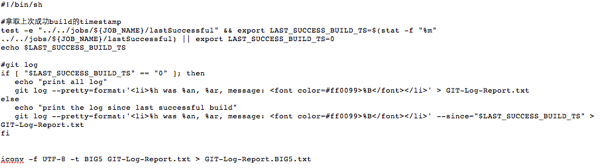
產生自己的git change log, 印到email上送出
我希望產生的log與 ${CHANGES_SINCE_LAST_SUCCESS…} 一樣是包含到上次成功build的間所以的log所以我需要知道上次成功建立的時間export LAST_SUCCESS_BUILD_TS=$(stat -f "%m" ../../jobs/${JOB_NAME}/lastSuccessful)知道時間之後,就要利用git log印出所以的commit messagegit log --pretty=format:'<li>%h was %an, %ar, message: <font color=#ff0099>%B</font></li>' --since="$LAST_SUCCESS_BUILD_TS" > GIT-Log-Report.txt最後會產生我想要的 GIT-Log-Report.txt但是!這個是一個UTF8 的檔案如果直接用 Jenkins 的網頁觀看 也會看到亂碼,因為他的網頁是用UTF-16讀取的而Email 呢? 我這裡是希望mail 送出Html的格式出來,而他是用 Big5 讀取的所以在使用 ${FILE, path="…..txt"} 之前要先用iconv -f UTF-8 -t BIG5 GIT-Log-Report.txt > GIT-Log-Report.BIG5.txt產生big5 的檔案,最後產生的script :然後再使用 ${FILE, path="GIT-Log-Report.BIG5.txt"}將資料印到 Email 上 :


Jenkins + KIF
經過 前一篇的 Jenkins + Unit Test by iOS-sim
這個也算順利的在Jenkins上面跑起來的
先照著 KIF Readme 產生基本的建構環境
接著做了一些修改
-
改用CocoaPod
由於如果用 read me 所講的方式加入 KIF framework 的話
會因為xcode workspace的設定檔案不會上傳到 git
且 xcode workspace 會用 pod install 產生
導致 Jenkins在build的時候 會找不到 libKIF.a (-lKIF 會找不到)
在 public的 pod search KIF 有一個非官方的來源
但是因為他很機婆的把 下面這一行加進去了 orz
s.xcconfig = { 'GCC_PREPROCESSOR_DEFINITIONS' => '$(inherited) RUN_KIF_TESTS=1' }
會導致 preprocessor defined 在 $(inherited) 就已經存在 RUN_KIF_TESTS=1
這樣會發生什麼事情呢? ==> 不論跑哪個 target都會讓他執行kif的劇本
這不是我想要的呀 T_T
所以呢.... 我就自己開了一個private 的 KIF spec without RUN_KIF_TESTS=1
而另外如 readme中,手動的將 RUN_KIF_TESTS=1 加入 需要的target 中
-
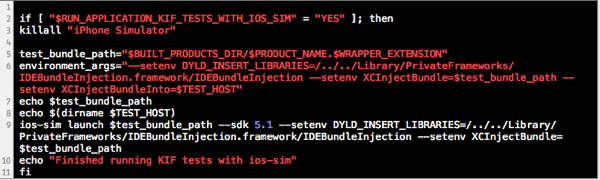
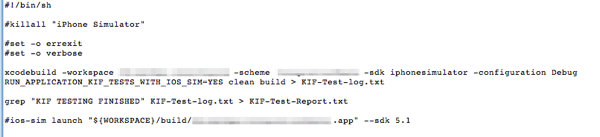
借用跑Unit Test的經驗,在target後面加入script
如果照readme中的script在 CI上跑,似乎會遇到權限的問題可能是因為產生的app的位置的關係吧?!後來我想,既然之前可以跑Unit Test,那就照同樣的處理方式吧!然後在 Jenkins 上 使用script並且在report Email 中加入最後會在Email中看到不過,現在即便是失敗了.... 信件還是Successful XDDD


開始的設定還是有點麻煩
不過至少後期能自動化測試
接下來就是寫劇本了!
2013年2月15日 星期五
Jenkins + Unit Test by ios-sim
經過了一連串折騰,終於發現
原來之前已經半成功了!
只是jenkins 的使用者權限開錯了,導致跑不動 ios-sim
以下是整個的經過
1. 原本打算使用 octest
在 command line 下要執行
xcodebuild -workspace ??????.xcworkspace -scheme ?????Test -sdk iphonesimulator5.1 -configuration Debug TEST_AFTER_BUILD=YES clean build | ocunit2junit
(https://github.com/ciryon/OCUnit2JUnit)
?????Test 是一個特殊的scheme ,建立後且執行 Test
但是這個在 ios 6 上遇到了問題
iOS 6 有些簡化用的語法 ex : @{ xxx:ccc} = [NSDictionary dictionary…..]
如果使用 -sdk iphonesimulator5.1 是不能建置的
但是如果使用 -sdk iphonesimulator 似乎會有無法註冊的問題
(http://longweekendmobile.com/2011/04/17/xcode4-running-application-tests-from-the-command-line-in-ios/) (http://www.raingrove.com/2012/03/28/running-ocunit-and-specta-tests-from-command-line.html)
這裡我實驗了很久還是卡住
(有可能問題與最後的解法是相同的....)
2. 後來決定不使用xcode原來呼叫simulator的方法
改用 ios-sim
接著我就遇到了
"Simulator session timed out.
的問題
https://github.com/phonegap/ios-sim/issues/5
看了問題討論 似乎只要把 檔案一個位置就好了
但是 因為現在在放假期間 我不太敢亂重開server
所以只好想想看要怎麼改他的使用者權限
最後發現....
因為我一直以來都是用 sudo launchctl load xxxxx
如果用 sudo 的話,則好像會是用 root 開 jenkins
而他沒有 GUI的權限(?我猜測的… 如果有錯麻煩告知一下嚕@@)
所以開不了 simulator 導致timeout
所以我改用 user帳號 ssh 登入 server
只執行 launchctl load xxxxx
就可以正常的跑Unit Test了
2013年1月31日 星期四
Jenkins - android + ant + iOS + Xcode (ota 設定)
ota 已經完成 一個月左右了
可是一直忘了上來記錄一下XD
我後來在額外加入shell 去執行
https://github.com/sveinungkb/ios-ota-buddy
shell :
mv build/*.ipa build/${JOB_NAME}-${BUILD_NUMBER}.ipa
otabuddy.sh plist build/${JOB_NAME}-${BUILD_NUMBER}.ipa http://xxx/${JOB_NAME}/builds/${BUILD_NUMBER}/ooo/${JOB_NAME}-${BUILD_NUMBER}.ipa build/${JOB_NAME}-${BUILD_NUMBER}.plist
寄出去的信件連結為:
<a href="itms-services://?action=download-manifest&url=http://ㄌ/${JOB_NAME}/builds/${BUILD_NUMBER}/ooo/${JOB_NAME}-${BUILD_NUMBER}.plist">
以上主要是 背後把
http://xxx/ 的位置 多一個 ln 到 build/ 中
讓http server 直接能下載的到..... 不過這樣 當然沒有密碼的保護了orz
可是一直忘了上來記錄一下XD
我後來在額外加入shell 去執行
https://github.com/sveinungkb/ios-ota-buddy
shell :
mv build/*.ipa build/${JOB_NAME}-${BUILD_NUMBER}.ipa
otabuddy.sh plist build/${JOB_NAME}-${BUILD_NUMBER}.ipa http://xxx/${JOB_NAME}/builds/${BUILD_NUMBER}/ooo/${JOB_NAME}-${BUILD_NUMBER}.ipa build/${JOB_NAME}-${BUILD_NUMBER}.plist
寄出去的信件連結為:
<a href="itms-services://?action=download-manifest&url=http://ㄌ/${JOB_NAME}/builds/${BUILD_NUMBER}/ooo/${JOB_NAME}-${BUILD_NUMBER}.plist">
以上主要是 背後把
http://xxx/ 的位置 多一個 ln 到 build/ 中
讓http server 直接能下載的到..... 不過這樣 當然沒有密碼的保護了orz
如何參與 開放原碼社群
http://people.debian.org.tw/~chihchun/2011/07/18/work-with-open-source-project/
說是給大一大二...
看來我的能力真的還只在大一大二 .... 淚
說是給大一大二...
看來我的能力真的還只在大一大二 .... 淚
2013年1月15日 星期二
2012年11月21日 星期三
Jenkins + Unit Test
(下午遇到的問題是....可能要先在自己的mac上 make過 framework才能跑 我猜是 SDK的問題)
接著可能要解決的問題
1. ghunit 的 templete file
2. INSTALL OCMock + OCHAMCREST
3. run on the Jenkins
4. 以及最重要的..... 究竟要怎樣使用qq
他有遇到的我也有遇到耶!
http://www.egeek.me/2012/10/03/jenkins-ghunit-launch-msg-error/
Jenkins + GHUnit
http://www.tuicool.com/articles/uUbuUn
http://gabriel.github.com/gh-unit/docs/appledoc_include/guide_command_line.html
http://gabriel.github.com/gh-unit/docs/appledoc_include/guide_ci.html
======================================
一直卡在最後出 report 的地方
後來想說還是用官方的 OCUnit
感覺整合性還是好很多
再配合 OCUnit2JUnit
應該會不錯用
繼續努力....orz
http://www.raingrove.com/2012/03/28/running-ocunit-and-specta-tests-from-command-line.html
要先多建立一個 scheme
然後設定其關連性
script 用 https://gist.github.com/2410839
用 系統內的好像會一直出問題 (系統內好像是新的 anyway 至少舊的可以用....)
最後再 jenkins 上面的指令用:
xcodebuild -workspace xxxxx.xcworkspace -scheme xxxxx -sdk iphonesimulator5.1 -configuration Debug TEST_AFTER_BUILD=YES clean build
iphonesimulator5.1 不用 iphonesimulator 這樣預設好像是會用 6.0 好像會有 顯示視窗大小的問題....
finally ..... 我一直放錯重點 明明應該是要好好寫 Unit test , 卻一直放在產生 report 上
搞了一個下午+晚上+隔天早上 .... 終於弄出一個至少可以用的orz
時間真不夠用...QQ
other ref
http://www.gerardcondon.com/blog/2012/09/20/further-jenkins-setup-code-signing/
http://www.stewgleadow.com/blog/2012/02/09/running-ocunit-and-kiwi-tests-on-the-command-line/
http://hataewon.tumblr.com/post/30045666799/how-to-use-subprojects-with-xcode-and-jenkins
http://hataewon.tumblr.com/post/30327012898/continuous-integration-for-cocoa-using-jenkins-part-ii
Unit test example ?!?!
https://github.com/iamleeg/BrowseOverflow/tree/master/BrowseOverflowTests
2012年11月18日 星期日
cocopod install
如果裝 gem install cocoapods 沒反應
可能是你的 gem 太舊了
升級 gem
508 gem -v
510 sudo gem update --system
513 sudo gem install cocoapods
CocoaPod 加入自己的 spec資料庫
https://github.com/CocoaPods/CocoaPods/wiki/Sharing-pod-specifications-with-yourself-and-the-world
指令
$ pod repo add my-spec-repo http://github.com/my-account/spec-repo.git======== 我想應該是這樣用
https://github.com/CocoaPods/CocoaPods/wiki/Creating-and-maintaining-a-pod
先在自己的專案下 ex: xxxlib 下建立 一個 xxxlib.podspe
$ pod spec create xxxlib
接著編輯這個podsec
編輯後!!!
$ pod spec lint --local

$ git add -A && git commit -m "Release 0.0.1."
$ git tag '0.0.1'
$ git push --tags
pod spec lint --local 只是先檢查格式對不對
接著commit 到git
然後加上tag
然後push到git server上
接著
$ pod push myspec
如果之前 有加入 pod repo add myspec xxxxx.git
那這裡就會自動更新 xxxxx.git server
然後接著 在重新載入到 seach list中
所以上面結束後再執行 pod search xxxlib
就可以看到他在 [myspec repo] 中了
2012年11月17日 星期六
Cocoapods library管理套件的引入
說來慚愧
寫了很久的程式,卻還沒正式開始寫 Unit Test 跟 版本控制 ,有時候真的覺得自己以前玩太兇,
不管,反正有總比沒有開始做好!
今天目標:
第三方的版本控制 + Xcode workspace
workspace 我之前都不是很清楚應該要拿這個幹嘛的
新開一個專案幾乎都是將原始碼啦進去
我自己也知道這樣很呆,而且在版本控制上會有很大的問題
之前又一直被當低階勞工....
真的應該要多了解一下手上的工具才是 orz
http://erlangprogram.com/use-xcode4-workspace
git + cocoapods
http://iiiyu.com/blog/2012/10/26/learning-ios-nontes-fourteen/
http://tw.polydice.com/2012/07/04/cocoapods/
http://josephjiang.com/entry.php?id=342
http://www.cnblogs.com/dragonstreak_1/archive/2012/10/19/2730979.html
如果用到自己的 可能需要這樣做
http://ishalou.com/blog/2012/10/16/how-to-create-a-cocoapods-spec-file/
http://cocoapods.org/
pod 的 dependency
Besides no version, or a specific one, it is also possible to use operators:
> 0.1 Any version higher than 0.1
>= 0.1 Version 0.1 and any higher version
< 0.1 Any version lower than 0.1
<= 0.1 Version 0.1 and any lower version
~> 0.1.2 Version 0.1.2 and the versions upto 0.2, not including 0.2
可能建立起來後 要讓 Jenkins 也能用....
http://tulusha.blogspot.tw/2012/04/jenkins-setup-for-building-xcode.html
先開始實作吧 之後再看看有什麼要記錄的
====== 2012/11/19 =========
Jenkins 上面
1. 因為使用 Cocoapod 所以前面加一個 shell
#!/bin/sh
pod install --no-color
2. 因為變成了 workspace 所以在 Xcode的套件上 需要多寫入 xxxx.xcworkspace
Xcode Schema File = "專案名稱" ex: HandWriting
Xcode Workspace File = xxxx.xcworkspace
Build output directory = ${WORKSPACE}/build (這個好像因為使用 workspace 所以如果不設定 不曉得他build 到哪裡去了orz)
所以對應到的 Archive 也要改一下
另外

也要記得溝 這樣好像才找的到 ....
3. 如果像是 facebook framework
後來也是直接改用 CocoaPods 來引入
因為 如果直接用framework 會讓 Jenkins 的相對路徑跑掉 因為在不同的電腦上
所以為了避免這個麻煩 就直接用 src來建立
現在大致上還有兩個問題:
1. 像是 facebook framework 這樣要怎樣在 jenkins 上重新指定位置?!
2. 像是coredata 產生的 resourcefile 要如何寫進 Cocopad中,讓他在建構的時候產生 並且引入到主要的project中
2012年11月15日 星期四
Jenkins - android + ant + iOS + Xcode
經過一陣的嘗試
Android 和 iOS的部份終於算是搞定大半了
iOS 在Build 的部份設定還算簡單
不過還沒有想過引用library的對應關係要怎樣設定 (因為我通常都是直接啦過去 這項好像很不好 orz)
不過最後 OTA的部份可能需要等 公司帳號申請下來再來做打算
Android 在build 的部份就花了一點時間搜尋
因為 Android在 Local端是用 Eclipse 來開發的
本身沒有直接產生 在Jenkins + ant 上面要用的build.xml
所以要利用 (ref - android)
./android update project -n ${JOB_NAME} -p ${WORKSPACE}
-n 會影響到產生的apk的名稱
-p 則是專案所在的資料夾
執行完後 就會產生一個build.xml
不過 可能有時會產生 叫你要輸入 --target 的選項
1. 首先要先檢查是否在Jenkins ref 到的 android SDK是否有 install 對應的api level
通常是上面的問題 因為沒有對應的api level 他會幫你檢查然後報錯
不過不要自己設定 --target,因為這是local 端已經寫好的 設定太多到時候其他專案重複利用性就會比較低了
接著是 如果這個android的專案有用到其他專案的jar
那 server 首先也要有對應的jar的專案
然後在 ant 的
設定中 加入
sdk.dir=/Users/Shared/Jenkins/android-sdk-macosx
android.library.reference.1=../libfacebook-android/
android.library.reference.2=../easyclass-android/
....
這部份其實可以在 專案資料夾中的 project.properties 看到
不過因為local端的對應位置通常跟 server不同 所以可能需要重新設定對應位置
另外 android.library.reference.n 的規則 可以參閱(ref - android)
apk 的發佈也等到 網路比較快 再想想看
初期可能先用S3看看
Android 和 iOS的部份終於算是搞定大半了
iOS 在Build 的部份設定還算簡單
不過還沒有想過引用library的對應關係要怎樣設定 (因為我通常都是直接啦過去 這項好像很不好 orz)
不過最後 OTA的部份可能需要等 公司帳號申請下來再來做打算
Android 在build 的部份就花了一點時間搜尋
因為 Android在 Local端是用 Eclipse 來開發的
本身沒有直接產生 在Jenkins + ant 上面要用的build.xml
所以要利用 (ref - android)
./android update project -n ${JOB_NAME} -p ${WORKSPACE}
-n 會影響到產生的apk的名稱
-p 則是專案所在的資料夾
執行完後 就會產生一個build.xml
不過 可能有時會產生 叫你要輸入 --target 的選項
1. 首先要先檢查是否在Jenkins ref 到的 android SDK是否有 install 對應的api level
通常是上面的問題 因為沒有對應的api level 他會幫你檢查然後報錯
不過不要自己設定 --target,因為這是local 端已經寫好的 設定太多到時候其他專案重複利用性就會比較低了
接著是 如果這個android的專案有用到其他專案的jar
那 server 首先也要有對應的jar的專案
然後在 ant 的
| Properties |
sdk.dir=/Users/Shared/Jenkins/android-sdk-macosx
android.library.reference.1=../libfacebook-android/
android.library.reference.2=../easyclass-android/
....
這部份其實可以在 專案資料夾中的 project.properties 看到
不過因為local端的對應位置通常跟 server不同 所以可能需要重新設定對應位置
另外 android.library.reference.n 的規則 可以參閱(ref - android)
apk 的發佈也等到 網路比較快 再想想看
初期可能先用S3看看
2012年11月12日 星期一
Jenkins git ssh
之前Jenkins 我一直搞不定 git by ssh
https://confluence.atlassian.com/pages/viewpage.action?pageId=270827678#SetupSSHforGitandMercurialonMacOSX/Linux-enablessh
後來終於知道大概是什麼原因了
1. Jenkins 是用Jenkins的權限
所以簡單來說 我製作一個 Jenkins的帳號 然後產生 rsa
2. 因為 Jenkins 用ssh時 不能還要輸入密碼
因為之前不知道 ssh-add 的這個指令
所以只要將 rsa 加入 ssh中 只要先連過一次,之後就不用打密碼了 .... 應該是之後都不用吧orz
參考下面資料
https://confluence.atlassian.com/pages/viewpage.action?pageId=270827678#SetupSSHforGitandMercurialonMacOSX/Linux-enablessh
Step 4. Start the ssh-agent and load your keys

Open a terminal window and enter the
ps -e | grep [s]sh-agent command to see if the agent is running:myhost:~ manthony$ ps -e | grep [s]sh-agent 9060 ?? 0:00.28 /usr/bin/ssh-agent -l
If the agent isn't running, start it manually with the following command:
myhost:~ manthony$ ssh-agent /bin/bash
Load your new identity into the
ssh-agent management program using the ssh-add command.$ ssh-add ~/.ssh/id_rsa Enter passphrase for /Users/manthony/.ssh/id_rsa: Identity added: /Users/manthony/.ssh/id_rsa (/Users/manthony/.ssh/id_rsa) myhost:~ manthony$
Use the
ssh-add command to list the keys that the agent is managing.$ ssh-add -l 2048 7a:9c:b2:9c:8e:4e:f4:af:de:70:77:b9:52:fd:44:97 /Users/manthony/.ssh/id_rsa (RSA)
2012年8月21日 星期二
Test-Driven Development,測試驅動開發
有點興趣
http://registrano.com/events/429374
活動時間:2012/08/28 7:30pm 開始,6:30pm 開始入場
Ref
http://en.wikipedia.org/wiki/Test-driven_development
http://ithelp.ithome.com.tw/question/10081081
上面這篇有反面意見
====================================
原本注意到的是 我開始想完 Unit Test
然後發現了這個活動
活動介紹裡面有一段文字是吸引我的
近年來敏捷開發已漸漸由很多公司所採納,其中重要的基礎便需要自動化測試輔助;
講者近來使用TDD方式開發獲益良多;尤其最近在研究小型裝置開發時,
不過反面意見卻覺得不適用於 敏捷式開發
訂閱:
意見 (Atom)